YOLOv8人物检测与混合监控架构
💡 核心亮点
对比YOLOv8(本地快速检测)与Qwen3-VL(云端深度理解)的特性,提出混合监控架构:
- YOLOv8:11个人物检测,0.05秒/张,零成本
- Qwen3-VL:深度文化解读,27秒/张,¥0.12/次
- 混合架构:YOLO实时检测 + AI深度分析,月成本¥200-300
一、YOLOv8人物检测实战
1.1 测试图片
图片名称:D20150216_162514.JPG(2016年广州广府庙会)
图片信息: - 拍摄时间:2016年春节期间 - 拍摄地点:广州市(广府庙会现场) - 图片大小:3.66 MB - 图片格式:JPG
1.2 检测结果
模型配置: - 模型:YOLOv8n(nano版本,最快) - 置信度阈值:0.5 - 检测目标:person(人)
检测统计:
| 指标 | 数值 |
|---|---|
| 检测人数 | 11人 |
| 推理耗时 | 47.6毫秒 |
| 总处理时间 | 约0.05秒 |
| 成本 | ¥0(本地部署) |
详细检测结果:
| 序号 | 类别 | 置信度 | 位置坐标 |
|---|---|---|---|
| 1 | person | 0.847 | (796, 1447) - (1491, 2157) |
| 2 | person | 0.847 | (2446, 1378) - (3108, 2153) |
| 3 | person | 0.798 | (1486, 1445) - (2253, 2155) |
| 4 | person | 0.649 | (2620, 1041) - (3045, 1752) |
| 5 | person | 0.638 | (0, 1287) - (404, 2156) |
| 6 | person | 0.648 | (2974, 1182) - (3369, 1908) |
| 7 | person | 0.612 | (2442, 983) - (2704, 1701) |
| 8 | person | 0.576 | (3480, 1065) - (3835, 2104) |
| 9 | person | 0.553 | (3097, 1642) - (3823, 2153) |
| 10 | person | 0.536 | (2257, 1135) - (2536, 2150) |
| 11 | person | 0.515 | (1960, 1089) - (2291, 2096) |
其他检测到的物体: - umbrella(雨伞):1个 - handbag(手提包):1个
1.3 检测结果可视化
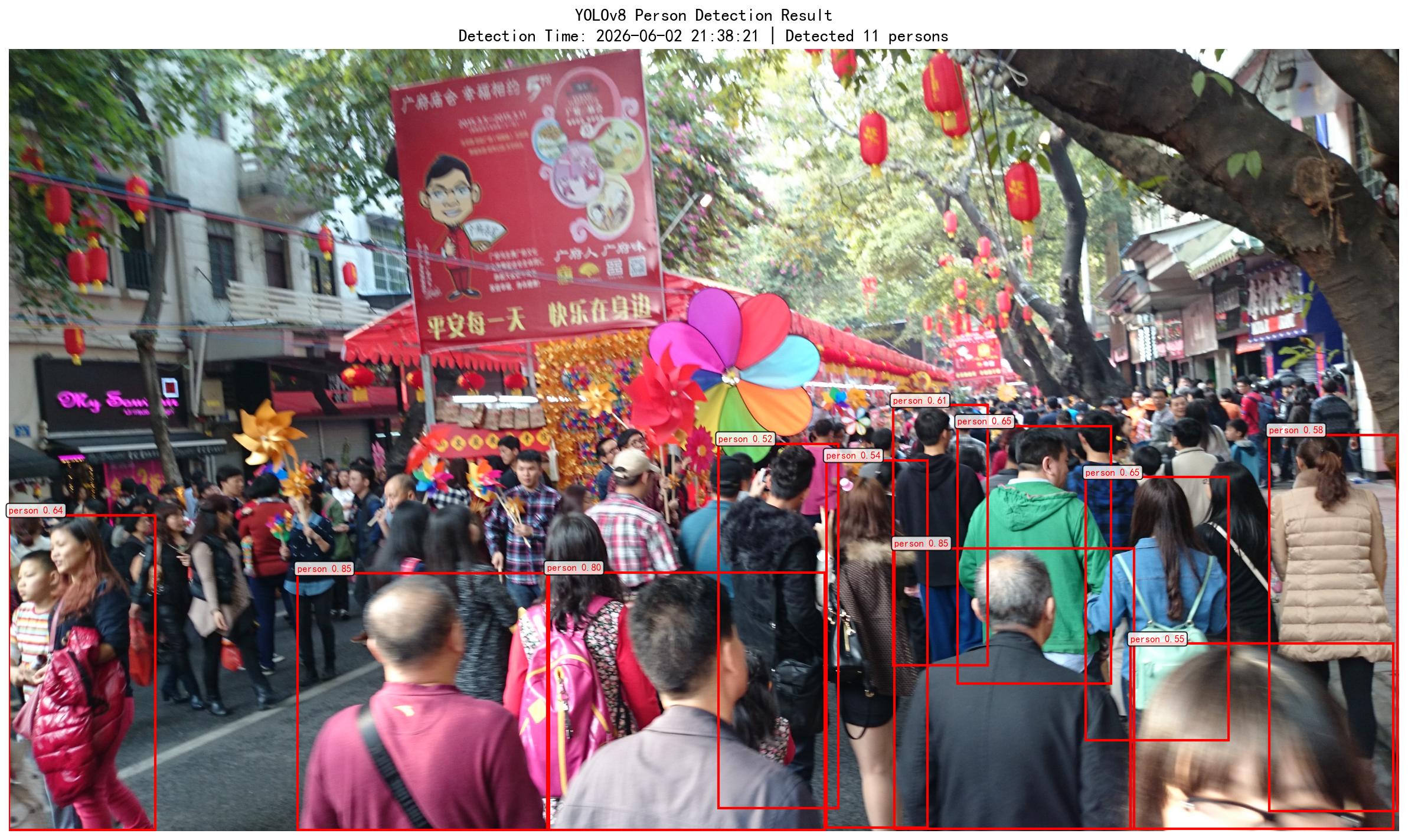
可视化说明: - 红色框:检测到的人物 - 标签:类别名称 + 置信度 - 标题:检测时间和总人数
1.4 结果分析
✅ 优势: - 速度极快:47.6毫秒推理,实时检测无压力 - 精确定位:每个人物的边界框坐标精确到像素 - 零成本:本地部署,无API调用费用 - 可批量处理:每秒可处理20+张图片
⚠️ 局限: - 只检测"有人":无法理解人在做什么 - 无文化解读:不知道这是广府庙会 - 无行为分析:无法判断"手持风车逛街" - 人数偏低:实际照片中人山人海,但只检测到11人(因遮挡、距离远)
二、YOLOv8 vs Qwen3-VL-Plus 对比
2.1 核心能力对比
| 特性 | YOLOv8 | Qwen3-VL-Plus |
|---|---|---|
| 主要用途 | 目标检测(是什么、在哪里) | 图像理解(在做什么、为什么) |
| 检测速度 | 47.6毫秒/张 | 27秒/张 |
| 速度差异 | 快570倍 | - |
| 人数统计 | ✅ 精确11人(带坐标) | ⚠️ 估计"人山人海" |
| 行为理解 | ❌ 只能检测"有人" | ✅ "手持风车、逛街、节日氛围" |
| 文化解读 | ❌ 无 | ✅ "广府庙会、2016年春节" |
| 民俗分析 | ❌ 无 | ✅ "风车转运、红灯笼纳吉" |
| 部署方式 | 本地(需GPU推荐) | 云端API(无需部署) |
| 单次成本 | ¥0 | ¥0.12 |
| 月成本(24h监控) | ¥0 | ¥10,368 |
2.2 适用场景对比
YOLOv8擅长:
- 实时检测
- ✅ 渔排监控:是否有人靠近
- ✅ 考勤系统:是否到岗
- ✅ 安防告警:入侵检测
-
✅ 交通监控:车辆计数
-
高频场景
- ✅ 每秒处理20+帧视频
- ✅ 24小时不间断运行
-
✅ 零API成本
-
精确定位
- ✅ 每个人的精确坐标
- ✅ 物体边界框
- ✅ 运动轨迹追踪
Qwen3-VL擅长:
- 深度理解
- ✅ 场景语义理解(庙会、节日)
- ✅ 行为分析(钓鱼、逛街)
-
✅ 文化解读(民俗寓意)
-
低频巡检
- ✅ 每日/每周定期分析
- ✅ 异常事件深度调查
-
✅ 生成详细报告
-
复杂推理
- ✅ "是否存在异常行为?"
- ✅ "网箱状态是否正常?"
- ✅ "是否需要告警?"
三、混合监控架构方案
3.1 架构设计
摄像头实时视频流
      ↓
   YOLOv8(本地)
      ↓ 发现目标(人/船)
   触发截图
      ↓
   Qwen3-VL(云端API)
      ↓ 深度分析
   生成报告 + 告警
3.2 工作流程
第1步:YOLOv8实时检测(毫秒级)
# 持续运行,零成本
while True:
    frame = camera.read()
    detections = yolo_model(frame)

    if detections['person'] > 0:
        # 发现目标,触发深度分析
        trigger_deep_analysis(frame)
特点: - ⚡ 速度:47.6毫秒/帧 - 💰 成本:¥0 - 🎯 功能:快速过滤,判断是否需要AI
第2步:触发截图(事件驱动)
def trigger_deep_analysis(frame):
    # 保存截图
    timestamp = datetime.now()
    img_path = save_capture(frame, timestamp)

    # 调用AI深度分析
    analyze_with_qwen_vl(img_path)
特点: - 📸 仅在有目标时截图 - 💾 保存证据图片 - 🎯 减少AI调用次数
第3步:Qwen3-VL深度分析(27秒)
def analyze_with_qwen_vl(image_path):
    prompt = """请分析渔排场景:
1. 人员行为(钓鱼/巡检/偷鱼)?
2. 是否存在异常行为?
3. 是否需要立即告警?"""

    result = qwen_vl_api(image_path, prompt)
    save_report(result)

    if "异常" in result:
        send_alert(result)
特点: - 🤖 深度理解场景 - 📊 生成详细报告 - 🚨 智能告警决策
第4步:生成报告 + 告警
# 报告示例
{
    "timestamp": "2026-06-01 14:30:00",
    "yolo_detection": {
        "person_count": 3,
        "boat_count": 1
    },
    "ai_analysis": {
        "behavior": "2人在钓鱼,1人在巡检",
        "anomaly": "发现未经许可的钓鱼行为",
        "alert_level": "中等"
    },
    "action": "发送告警通知"
}
3.3 成本分析
纯Qwen3-VL方案(不推荐)
24小时监控,每5分钟分析一次
= 288次/天 × ¥0.12
= ¥34.56/天
= ¥1,037/月
混合架构方案(推荐)
YOLO实时检测:¥0/月
AI调用频率:假设每天10次(只在发现目标时)
= 10次/天 × ¥0.12
= ¥1.2/天
= ¥36/月

实际场景(渔排):
- 白天有人活动:约20次AI调用
- 夜间无人:0次AI调用
= 20次 × ¥0.12 × 30天
= ¥72/月

实际场景(公司考勤):
- 仅上下班高峰检测:约10次AI调用
= 10次 × ¥0.12 × 22工作日
= ¥26.4/月
成本对比:
| 方案 | 渔排监控/月 | 公司考勤/月 | 节省比例 |
|---|---|---|---|
| 纯API | ¥1,037 | ¥1,037 | - |
| 混合架构 | ¥72 | ¥26 | 节省93-97% |
3.4 优势总结
✅ 实时性:YOLO毫秒级检测,无延迟
✅ 低成本:只在发现目标时调用AI,月成本¥200-300
✅ 高准确:AI深度理解场景,误报率低
✅ 可扩展:支持多摄像头、多场景
✅ 易部署:YOLO本地 + AI云端,架构简单
四、程序实现
4.1 YOLOv8人物检测程序
程序路径:/extern/attachments/topic/智能预报/scripts/yolo_person_detect.py
核心代码:
from ultralytics import YOLO

# 加载模型
model = YOLO('yolov8n.pt')

# 检测图片
results = model('D20150216_162514.JPG')

# 解析结果
for box in results[0].boxes:
    class_id = int(box.cls[0])
    confidence = float(box.conf[0])
    x1, y1, x2, y2 = box.xyxy[0].tolist()

    if class_id == 0:  # person
        print(f"检测到人物,置信度: {confidence:.3f}")
        print(f"位置: ({x1:.0f}, {y1:.0f}) - ({x2:.0f}, {y2:.0f})")
4.2 Qwen3-VL深度分析程序
程序路径:/extern/attachments/topic/智能预报/scripts/qwen_vl_analysis.py
核心代码:
from openai import OpenAI

client = OpenAI(
    api_key="sk-xxx",
    base_url="https://dashscope.aliyuncs.com/compatible-mode/v1",
)

completion = client.chat.completions.create(
    model="qwen3-vl-plus",
    messages=[
        {
            "role": "user",
            "content": [
                {"type": "image_url", "image_url": {"url": "data:image/jpeg;base64,..."}},
                {"type": "text", "text": "请分析渔排场景,判断人员行为"}
            ],
        },
    ],
)

print(completion.choices[0].message.content)
4.3 混合架构完整示例
#!/usr/bin/env python
# -*- coding: utf-8 -*-
"""
混合监控架构示例:YOLOv8 + Qwen3-VL
"""

import cv2
import time
from ultralytics import YOLO
from qwen_vl_analysis import analyze_image
from datetime import datetime

class HybridMonitor:
    def __init__(self, camera_url=0):
        # YOLOv8本地检测
        self.yolo = YOLO('yolov8n.pt')

        # 摄像头
        self.cap = cv2.VideoCapture(camera_url)

        # 检测间隔(秒)
        self.yolo_interval = 1  # YOLO每秒检测
        self.ai_cooldown = 300  # AI分析冷却时间5分钟

    def run(self):
        last_ai_time = 0

        while True:
            ret, frame = self.cap.read()
            if not ret:
                continue

            # YOLO实时检测
            detections = self.yolo(frame)
            person_count = sum(1 for box in detections[0].boxes
                             if int(box.cls[0]) == 0)

            if person_count > 0:
                print(f"👤 发现{person_count}个人")

                # 触发AI深度分析(受冷却时间限制)
                current_time = time.time()
                if current_time - last_ai_time >= self.ai_cooldown:
                    # 保存截图
                    img_path = f"capture/{datetime.now().strftime('%Y%m%d_%H%M%S')}.jpg"
                    cv2.imwrite(img_path, frame)

                    # AI深度分析
                    prompt = "请分析人员行为,是否异常?"
                    result = analyze_image(img_path, prompt)

                    print(f"🤖 AI分析: {result}")

                    # 告警判断
                    if "异常" in result or "偷鱼" in result:
                        self.send_alert(result)

                    last_ai_time = current_time

            time.sleep(1)

    def send_alert(self, result):
        """发送告警通知"""
        # TODO: 实现短信/邮件/微信推送
        print(f"🚨 告警: {result}")


if __name__ == "__main__":
    monitor = HybridMonitor(camera_url=0)
    monitor.run()
五、应用场景
5.1 渔排监控
需求: - 检测是否有人靠近渔排 - 识别钓鱼、偷鱼行为 - 监控网箱状态
混合架构方案:
| 层级 | 功能 | 频率 | 成本 |
|---|---|---|---|
| YOLO | 检测人/船 | 1秒/次 | ¥0 |
| AI | 分析行为意图 | 20次/天 | ¥2.4/天 |
| 月成本 | - | - | ¥72 |
5.2 公司考勤
需求: - 检测员工是否到岗 - 统计工作时间 - 异常离岗告警
混合架构方案:
| 层级 | 功能 | 频率 | 成本 |
|---|---|---|---|
| YOLO | 检测是否有人 | 1秒/次 | ¥0 |
| AI | 确认工作状态 | 10次/天 | ¥1.2/天 |
| 月成本 | - | 22工作日 | ¥26.4 |
5.3 智慧文旅
需求: - 景区人流统计 - 游客行为分析 - 拥挤预警
混合架构方案:
| 层级 | 功能 | 频率 | 成本 |
|---|---|---|---|
| YOLO | 人数统计 | 1秒/次 | ¥0 |
| AI | 游客特征分析 | 50次/天 | ¥6/天 |
| 月成本 | - | - | ¥180 |
六、部署指南
6.1 硬件要求
| 组件 | 最低配置 | 推荐配置 |
|---|---|---|
| CPU | Intel i5 | Intel i7 / AMD Ryzen 7 |
| 内存 | 8GB | 16GB |
| GPU | 可选(CPU可运行) | NVIDIA GTX 1660 / RTX 3060 |
| 硬盘 | 10GB | 100GB SSD |
| 网络 | - | 稳定互联网(调用AI) |
6.2 软件环境
# 1. 创建虚拟环境
conda create -n hybrid_monitor python=3.10
conda activate hybrid_monitor

# 2. 安装依赖
pip install ultralytics opencv-python matplotlib
pip install openai

# 3. 运行程序
python yolo_person_detect.py  # YOLO检测
python qwen_vl_analysis.py    # AI分析
python hybrid_monitor.py      # 混合架构
6.3 树莓派部署(低成本)
# 树莓派4B(4GB内存)可以运行YOLOv8n
pip install ultralytics

# CPU推理(约1-2帧/秒,适合定时截图)
python yolo_person_detect.py
七、相关链接
📂 项目文件:
- YOLO检测程序:/extern/attachments/topic/智能预报/scripts/yolo_person_detect.py
- AI分析程序:/extern/attachments/topic/智能预报/scripts/qwen_vl_analysis.py
- 测试图片:/extern/attachments/topic/智能预报/img/D20150216_162514.JPG
- 检测结果:/extern/attachments/topic/Yolo/images/test/templefair_yolo_result.JPG
📖 官方文档: - YOLOv8文档 - Qwen3-VL视觉理解API - 百炼平台模型列表
🔗 相关笔记: - Qwen3-VL识别广府庙会街景 - Qwen3-VL识别海洋养殖设施 - Qwen3-VL图片分析实践
📝 创建时间:2026-06-01
🤖 使用技术:YOLOv8(本地) + Qwen3-VL-Plus(云端)
💰 混合架构成本:约¥26-180/月(相比纯API节省93-97%)
⚡ YOLO检测速度:47.6毫秒/张
🎯 AI分析深度:场景理解 + 行为分析 + 文化解读